High Availability
Restart the virtual machine automatically when it crashes, stops responding, or was left stopped because VirtualProg or the Mac quit unexpectedly.
📸 Screenshot:
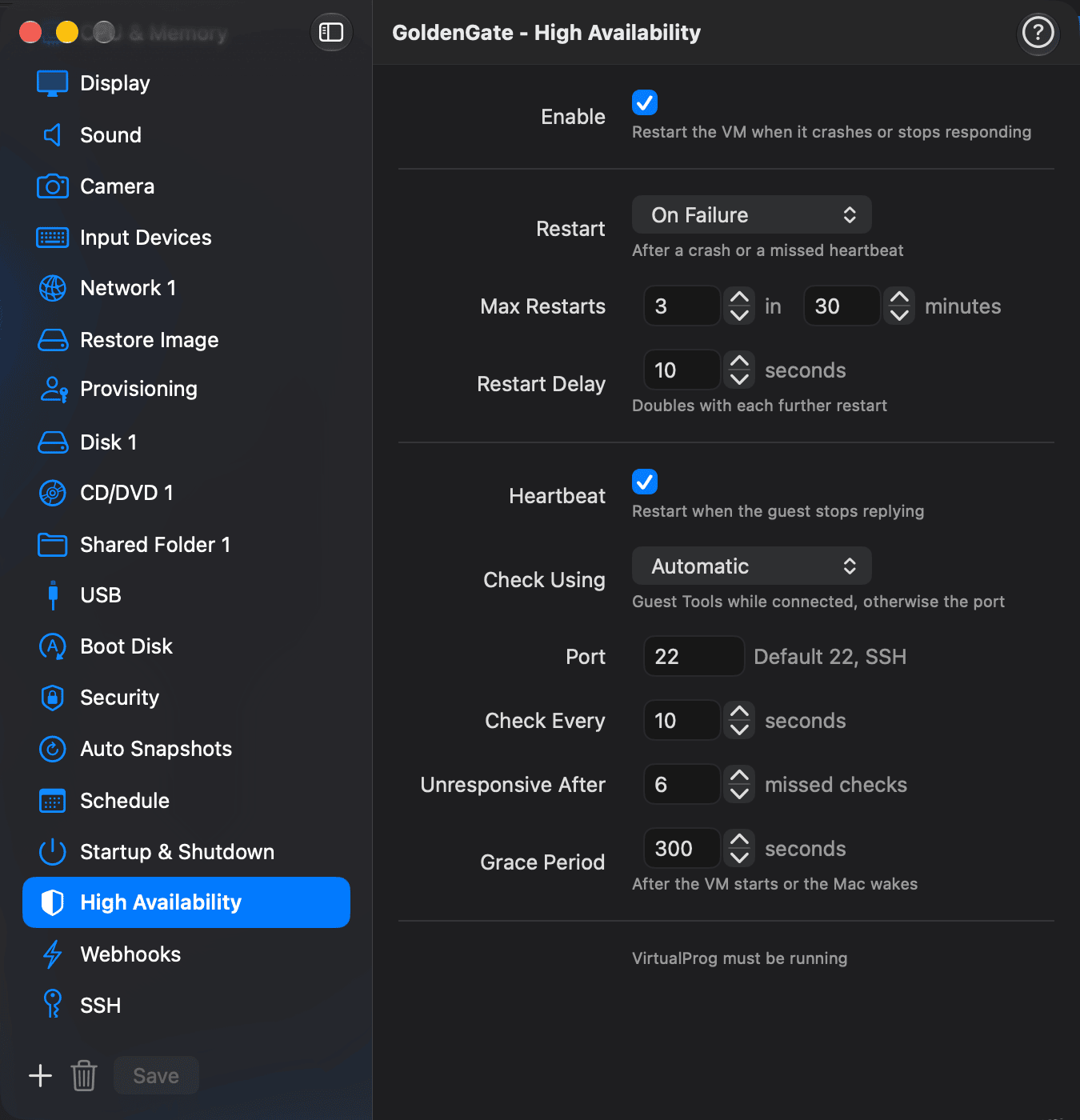
Fields
| Field | Description |
|---|---|
| Enable | Turn High Availability on or off for this VM. |
| Restart | On Failure restarts after a crash, a missed heartbeat or an unexpected exit. Always also restarts the VM when it is shut down from inside the guest. |
| Max Restarts | Restarts allowed within the window (1–20), and the window in minutes (5–1440). When the limit is reached, the VM stays stopped and its status shows Failed. |
| Restart Delay | Wait before the first restart (5–300 seconds). Each further restart in the window waits twice as long, up to 5 minutes. |
| Heartbeat | Restart the VM when the guest stops replying. |
| Check Using | What the heartbeat checks. Automatic (the default for new VMs) asks Guest Tools while they are connected and checks the port otherwise. Guest Tools asks only the Guest Tools agent. Port checks only the service on the port. |
| Port | The TCP port to check, with Automatic and Port. Default 3389 (Remote Desktop) for Windows, 22 (SSH) otherwise. Any service works (SSH, Remote Desktop, a web server, a database), as long as it replies. |
| Check Every | Seconds between checks (5–300). |
| Unresponsive After | Missed checks in a row before the VM is restarted (2–60). |
| Grace Period | Missed checks don't count for this long after the VM starts or the Mac wakes. |
How It Works
- VirtualProg must be running. High Availability works from the Control Center, like the scheduler.
- Stops you ask for are never restarted. That includes Stop, Shut Down and Suspend from VirtualProg, the web dashboard or the CLI, the schedule, Mac sleep and shutdown, closing the VM window, quitting VirtualProg, and snapshot or checkpoint restores.
- Crashes are restarted with either policy. A VM that fails to start is not retried.
- Heartbeat checks that a program in the guest replies, not only that the guest accepts a connection or answers ping: a guest whose kernel panicked or hung often still does both.
- Guest Tools replies come from the Guest Tools agent over the VM's internal channel, so they need no network, IP address or open port. The agent runs once someone signs in to macOS or Windows guests, and from boot in Linux guests.
- Port replies come from the service on the port, so they also show that the service and the guest's network work.
- Automatic uses Guest Tools while they are connected. When they are not installed, not signed in or disconnected, it checks the port instead, and signing out of the guest is never counted as missed. If Guest Tools stop replying while connected, the port is checked too; the check counts as missed only when the port does not reply either.
- With Guest Tools, signing out of a macOS or Windows guest disconnects the agent, and each check counts as missed. Choose Automatic or Port for guests that are not always signed in.
- Checks start after the guest's first reply, so a guest that never replies (no Guest Tools, no IP address, a firewall, no service on the port) is not restarted by the heartbeat. If there is still no reply one grace period after the VM starts, the status shows heartbeat not active with the reason, the shield turns yellow, and the VM log says so once. After the first reply, checks without a reply count as missed: keep the service running, or turn the heartbeat off before you stop it. The VM log names what answered, for example Guest Tools or port 22.
- Unexpected exits. If VirtualProg or the Mac stops while a protected VM runs, the VM is started again the next time VirtualProg opens. A normal quit or Mac restart does not do this; use Auto Start for that.
- VMs that are password protected, still installing, or have a checkpoint disk change pending are not restarted.
Status
A shield next to the VM in the Control Center shows the state: grey when the VM is stopped, green while it is monitored, orange while a restart is pending, and red when restarts stopped (Failed). Click it to see the last failure and the restart count. Reset clears a Failed state and the count. The VM's info view, the web dashboard and the iOS and Android apps show the same status.
Each failure and restart is written to the VM's log, shown as a notification and sent to the VM's webhooks. A crash shows no error alert while High Availability is on, since the VM is restarted.